Why to Align a Multichannel System?
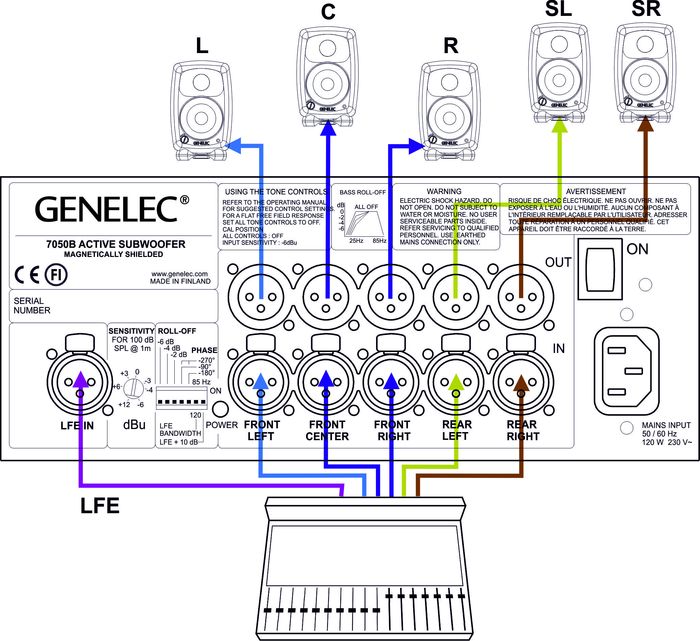
The main goal in the alignment of a multichannel system is to set the subwoofer output level the same as the sound output level of the main monitor system. The LFE output of the mixing desk or decoder should be connected to the LFE input on the subwoofer.
For the 7050B, 7060B, 7070A, 7071A, 7073A products:
The LFE input has the same sensitivity as all other signal inputs unless the ‘LFE +10 dB’ DIP switch is ON. The switch is used when there is no +10 dB gain in the LFE channel output. The switch is set to 0 dB when there is already a +10 dB additional gain in the LFE channel output.
What reference level to use?
To ensure repeatable results in the finished product, the SMPTE (Society of Motion Pictures and Television) has set standard monitoring levels for cinema post-production work. The SMPTE reference level at the listening position is 85 dB SPL, on C weighted/slow scale. The input signal to the monitors is -20 dB FS (rms) full bandwidth pink noise. The SMPTE RP200 uses an electrical reference level of -18 dB FS.
For music mixes, there are no standardized levels. The level that the engineer chooses is arbitrary and based on personal taste, as is the level chosen by the end user. The level is typically 75 dB SPL for television audio work and 75-95 dB SPL for music production work.
Manual calibration of the level and frequency response
Monitors are first calibrated to have flat response at the listening position. This is achieved by doing the following:
Calibrate the monitor frequency responses using an acoustical measuring system with the subwoofer bypassed or disconnected. Then connect the Genelec subwoofer and adjust the subwoofer level, bass roll-off and phase so that the measured combined frequency response of the subwoofer and the monitor extends flat to the LF cut-off of the subwoofer, paying special attention to the subwoofer to monitor crossover point.
Alternative level calibration methods
If acoustic measurement system is not available for aligning the system, then follow the guidelines that can be found in the operating manual for adjusting the frequency response:
Level calibration using a ⅓ octave real time analyzer, broadband pink noise and an SPL meter
Connect the Genelec 5.1 system and play broadband pink noise signal (20 Hz – 20 kHz) through the subwoofer and one of the monitors, for example the centre channel monitor. Adjust the acoustic settings in the subwoofer and monitors so that the level in each band on the RTA analyser reads the same value. Then, set the output level of each channel to give the same acoustical level at the listening position.
Level calibration using filtered pink noise and an SPL Meter
You need to have filtered pink noise to calibrate the levels of the subwoofer and the main channels. You can use a copy of the TMH Corporation 'Multichannel Studio Test Tape' that includes the various test signals required.
Pink noise filtered to a passband 500 Hz to 2 kHz is used for adjusting the monitor levels, and between the frequency range 20 Hz to 80 Hz is used for calibrating the subwoofer level. Please note: If the standard recorded level of filtered pink noises is -18 dBFSrms for SMPTE RP200's (-20 dBFSrms for SMPTE) and then the absolute level calibration can be made so that the sound level meter reads a level 2 dB lower than specified for broadband pink noise. This is because there is less energy due to band limiting of the band-pass noise.
- Connect to monitors and play the 500 Hz to 2 kHz filtered pink noise. Set the SPL Meter to C-weighting and slow reading. Adjust each main channel individually to have the same SPL level at the listening position.
- Play 20 to 80 Hz filtered pink noise through the subwoofer. The correct adjustment gives a reading 3dB lower than the one for the monitors because the C weighting lowers the reading in the SPL meter at those frequencies. If there is no HP filter in the SPL meter then the reading should be the same as for the monitors.





















 Filtres